
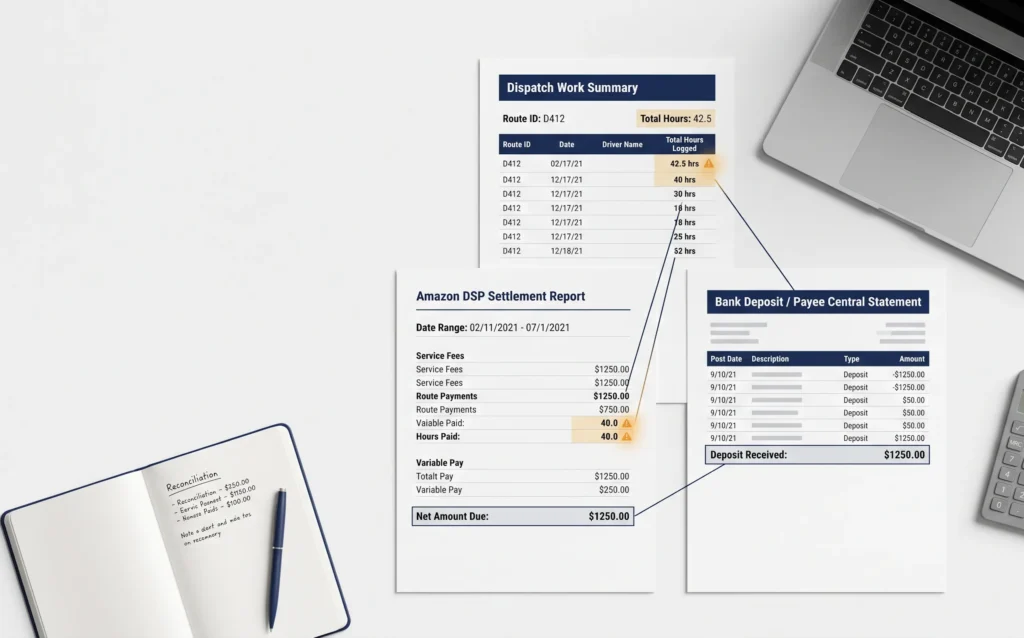
A 30 route DSP owner spent four months wondering why the bonus checks felt smaller than they should. The scorecard said Fantastic. The settlement kept applying Great. Nobody caught it, because the settlement report looked fine on its own and the bank deposit matched the settlement number every week. The real problem sat one layer deeper, in the gap between what the scorecard said and what the settlement actually paid, a gap that never surfaces unless you go looking for it.
That gap is the pattern behind most DSP settlement losses. Most owners check two things, their dispatch log against the settlement report. That catches obvious mistakes. What it misses is everything that happens between the settlement claim and the actual deposit, plus an entire category of fleet payments almost nobody tracks separately. This guide covers the full settlement structure, the real scorecard system behind your bonus pay, the reconciliation categories most guides skip, and a weekly process for catching errors before the dispute window closes.
Key Takeaways
- The scorecard has six tiers, not four, and Safety and Compliance acts as a hard ceiling on the whole score.
- A complete reconciliation checks three sources: dispatch data, the settlement, and Payee Central, not two.
- Fleet supplement (AFS) errors are invisible by design. They don’t show up as a deduction, they just don’t show up at all.
How Amazon Pays DSPs: Settlement Structure
Amazon pays DSPs on a weekly settlement cycle. Each settlement covers one service week, usually Saturday through Friday, and the deposit lands in your business bank account roughly five to ten business days after that week ends.
What’s In a Weekly Settlement
Every settlement is built from several components, added together and then reduced by a separate set of deductions.
| Component | What It Is |
| Base route pay | Fixed amount paid for each route dispatched, usually the largest single piece |
| Per package / per stop fees | Variable pay added once volume crosses a set threshold |
| Scorecard incentive | Bonus tied to your weekly performance rating, the most variable line on the settlement |
| Peak / surge pay | Extra pay during holidays and major shopping events |
| Step plan payments | Growth bonus tied to actively adding routes |
| Chargebacks | Deduction for delivery problems, usually the most disputed line item |
| Equipment / program deductions | Smaller recurring costs like phone, uniform, and technology fees |
| Adjustments | Corrections carried over from a prior settlement, can move the total in either direction |
Once every positive component is added and every deduction subtracted, what remains is the net settlement deposit, the number that shows up in your bank feed. The problem with looking only at that final number is that a mistake in any single component can hide inside a normal looking total. A missed AFS payment and an unexpected chargeback can land in the same week and cancel each other out, so the deposit looks unremarkable while two separate errors sit buried inside it.
Where Settlement Data Lives
The detail behind these numbers sits in the DSP Console (older material sometimes calls it the Relay Console). Each week’s settlement includes a summary page, a route level breakdown, a chargeback list, and the incentive calculation showing which scorecard tier was applied. Most errors hide in the route level and chargeback detail, not the summary page, so the summary alone is never enough to catch a mistake.
The Scorecard Multiplier: Six Tiers, Not Four
Most guides describe Amazon’s DSP rating using four labels: Fantastic, Great, Fair, Poor. That list is outdated.
The Real Tier System
| Tier | What It Generally Means |
| Fantastic Plus | Top tier performance held consistently, not just on a good week |
| Fantastic | Strong performance across most metrics |
| Great | Solid but below top tier, incentive pay reduced |
| Good | Middle of the range |
| Fair | Below target, minimal or no incentive pay |
| At Risk | Route allocation and contract standing at risk |
As of March 2026, Amazon requires 88 percent of a DSP’s drivers to meet performance targets before the business can qualify for Fantastic Plus at all.
The Safety Score Acts as a Ceiling
Here’s the detail most owners never hear about until it costs them money. Safety and Compliance acts as a ceiling on the entire scorecard. If that one category comes back as Great, the overall rating cannot rise above Great, no matter how strong every other metric is. A DSP can post near perfect delivery numbers and still get capped by one weak safety score.
Key Metrics and Thresholds
| Metric | What It Measures | Fantastic Level Target |
| Delivery Completion Rate (DCR) | Packages delivered vs. dispatched | Around 99% or higher |
| DPMO | Defects per million opportunities | Under 1,500 |
| Safe Driving (FICO style score) | Braking, acceleration, speeding, phone use | 800 or higher |
| Speeding Event Rate | Speeding incidents per 100 trips | Under 10 |
| Scan Compliance | Correct scanning at each delivery step | Around 99.9% |
| Attrition Rate | Drivers lost and replaced | 1% or lower |
| On Time Preventative Maintenance (OTPMC) | Vehicles serviced on schedule | High compliance, one week lag |
What Tier Changes Actually Cost
Moving between tiers has a real weekly dollar impact. A Fantastic rating can add $4,000 to $8,000 a week in incentive pay for a 25 route DSP. Great typically brings in 60 to 80 percent of that maximum, and Fair drops to $0 to $2,400 a week. Annualized, the swing between Fantastic and Fair can exceed $200,000 for a mid size operation, which makes the scorecard a financial number worth the same weekly attention as the bank deposit.
The Reconciliation Triangle: Three Sources, Not Two
Most reconciliation advice compares two things, the dispatch log against the settlement. That catches some errors but misses an entire category, because it assumes the settlement figure is what actually got paid.
A complete reconciliation checks three sources against each other.
Work Summary. This is the DSP’s own delivery data, routes run, packages delivered, stops completed. It’s the ground truth of the operation, recorded independently of anything Amazon calculates or reports back. Every other number in the reconciliation process should ultimately trace back to this one.
Settlement and Invoices. This is Amazon’s claim, the weekly settlement total plus any separate invoices for fleet charges, incentives, or deductions. It represents what Amazon has calculated it owes you, not necessarily what it has actually paid. Errors in the underlying math, a wrong scorecard tier, a missed AFS charge, show up here first.
Payee Central. This is the portal showing actual deposits. It is not the same as the settlement report. The settlement is a claim. Payee Central is the record of what was actually paid, and it’s the source almost nobody checks separately.
These three numbers should agree, and often don’t. A settlement can show a deposit that never actually lands because of a processing error. A route can appear in the dispatch data and be missing from the settlement entirely. Checking only two of the three sources means trusting the third blindly, and that’s exactly where missing money tends to hide.

Fleet and AFS: The Reconciliation Category Most DSPs Miss
There’s a whole layer of DSP payments tied to vehicles that almost never gets covered in reconciliation guides. Amazon offers a fleet supplement, commonly shortened to AFS, extra pay tied to specific vans meeting eligibility requirements based on active status, grounded status, and time out of service.
Because eligibility status changes week to week as vehicles move in and out of the shop, it’s easy for Amazon’s system to apply for the wrong status and miss a supplement payment. Unlike a chargeback, which shows up as a visible deduction, a missed AFS payment often doesn’t appear anywhere. Nothing flags it. The money simply never shows up, and there’s no line item to notice is wrong because the line item just isn’t there.
Tracking fleet status closely, which vans are active, which are grounded, and for how long, and comparing that against what the settlement shows for fleet pay each week is the only reliable check. Any mismatch is worth raising with your account manager directly and quickly, since fleet disputes get harder to resolve the further back they go.
Chargebacks: Categories and Financial Impact
Chargebacks are deductions Amazon takes when something goes wrong with a delivery attributed to your drivers. The definitions are broad, and not every chargeback is accurate.
| Type | Typical Amount |
| Damaged package | $15 to $75+ |
| Missing package | $20 to $100+ |
| Concession | $10 to $200+ |
| Late delivery | $5 to $20 per package |
| DNR (Did Not Receive) | $25 to $150 |
| Safety incident | $100 to $5,000+ |
For a 25 route DSP, chargebacks typically run $400 to $2,500 a week during normal operations, climbing to $4,000 to $6,000 a week during peak season. Annualized, a disciplined operation sees chargebacks around 1.2 percent of revenue, roughly $20,800 a year. An average operation runs closer to 3.5 percent, around $62,400 a year, and a poorly managed operation can exceed 7 percent, over $130,000 a year. The gap between disciplined and average alone is more than $41,000 a year, often more than an owner’s own take home pay.
Dispute windows generally run 7 to 14 days depending on chargeback type, and missing the window means the deduction stands with no further recourse. DSPs with good documentation (delivery photos, GPS timestamps, driver notes) see dispute win rates commonly cited in the 30 to 50 percent range. On $62,400 a year in chargebacks, disputing half that total and winning 35 percent works out to roughly $10,900 recovered in a year, for a weekly habit of reviewing a report.
How This Money Actually Disappears
Go back to the 30 route DSP from the opening. The scorecard genuinely showed Fantastic that week. The settlement applied the Great incentive rate instead, a tier lag error where the settlement engine pulled the prior week’s rating. On its own, that’s roughly $1,500 to $2,000 in underpaid incentive for a DSP that size, and it took four months to notice because the dispatch log matched the settlement’s route count and the bank deposit matched the net total. Both standard checks passed. The only way to catch it was comparing the DSP Console’s scorecard tier against the incentive calculation by name, Fantastic against Great, a comparison most owners never think to make because both numbers look legitimate on their own.
Reading a Settlement Line by Line
Start with route count, comparing the settlement against your dispatch log to confirm every route dispatched appears. Next, verify variable pay by comparing package and stop counts, and confirm peak surcharges applied on the correct dates. Then check the incentive tier against what the DSP Console showed that week, watching for the tier lag issue where settlements sometimes apply the prior week’s tier. After that, review each chargeback for duplicate tracking numbers and incorrect amounts. Finally, reconcile the settlement’s net amount against the actual bank deposit through Payee Central.
Common Errors to Catch
These five patterns account for most of the money DSPs recover once they start checking settlements line by line.
Incorrect scorecard tier application. The tier applied to a settlement sometimes lags a week, so a rating that moved up to Fantastic can still get billed at the lower Great rate. Keep your own weekly log of the tier shown in the DSP Console and compare it against the settlement.
Duplicate chargebacks. The same tracking number occasionally gets charged in two separate settlement weeks, usually because a complaint is processed once and reprocessed later. Sorting the chargeback report by tracking number across a rolling four week window is the fastest way to spot these.
Missing peak surcharges. Amazon pays elevated rates on designated peak days, and these surcharges don’t always apply correctly to every route. Keep a calendar of announced peak dates and check that every route dispatched on those days received the higher rate.
Routes not reflected on the settlement. A route can be fully dispatched and completed and still show up missing or at zero pay, usually during a station transition or system glitch. Any dispatched route missing from the settlement’s route level detail is money still owed.
Wrong base rate applied. A contract amendment or station change can leave the old base rate applied past the date it should have changed. Know the contracted rate by station and route type, and confirm routes dispatched times base rate matches the settlement.

Timing Differences Between Settlements and Bank Deposits
A settlement total and a bank deposit don’t always land as a clean one to one match, and most of the time this isn’t an error at all.
A large settlement can split across two separate deposits on two different business days. Amazon can also hold back settlement funds if there’s an open contract dispute or a compliance issue. ACH payments can take one to three business days to clear, while wires typically land the same day. A settlement deposited on the first of the month can also cover a service week that technically falls in the prior month, which matters for booking revenue correctly.
A simple log recording the settlement ID, service week, gross amount, net amount, and both the expected and actual deposit date makes this easy to track over time. Once every settlement for a month reconciles to a bank deposit with zero variance, you can close the month with real confidence in the number.
Monthly Revenue Analysis
Weekly reconciliation catches individual errors as they happen. A monthly view catches the trends that a single week can’t show.
| Metric | How to Calculate It | What It Tells You |
| Gross revenue | Sum of all positive settlement components | Total earning power before deductions |
| Chargeback rate | Total chargebacks ÷ gross revenue | Delivery quality cost, target under 3% |
| Incentive capture rate | Actual incentive ÷ max possible incentive | How well the scorecard is being managed |
| Revenue per route per day | Gross revenue ÷ (routes × days) | Per unit economics over time |
| Revenue per package | Gross revenue ÷ total packages | Volume efficiency |
| Net revenue | Actual bank deposits for the month | Real cash received |
| Settlement to deposit lag | Days between service week and deposit | Useful for cash flow planning |
A rolling twelve month view of these numbers makes seasonal patterns obvious and makes a genuine problem stand out from normal volume swings. A chargeback rate that jumps from 2 percent to over 4 percent in a single month, without a matching jump in volume, points to an operational issue rather than a busy season.
Peak Season Reconciliation
Peak season (Prime Day, Black Friday, the holiday surge) is when reconciliation matters most and gets checked least, usually because it’s also when everyone is busiest running the operation. Surge pay eligibility gets more complex, chargeback volume rises with delivery volume, and AFS status changes more often as vans see more wear. The fix isn’t a different process, it’s the same weekly cadence run without skipping a week, since peak is exactly when a missed check compounds fastest.
Manual Reconciliation Versus AI Assisted Reconciliation
Both approaches can catch errors, but they aren’t solving the same problem the same way. The real question isn’t which method is more accurate on any single settlement, it’s which one you can sustain every week without exception.
Manual reconciliation works, and plenty of DSP owners do it successfully with a spreadsheet and discipline. What’s hard to sustain by hand is checking all three sources every week, tracking fleet eligibility separately, and never missing a dispute deadline, especially during a busy stretch or peak season.
This is where pattern matching software, like BeanSquad’s Route Recon AI™, can help, not by replacing judgment on which chargebacks are worth disputing, but by handling the repetitive cross referencing automatically and flagging what looks off for a person to review. It makes sure the three way check happens every week without fail, so a missed AFS payment or a duplicate chargeback doesn’t sit unnoticed for months.
Building a Weekly Reconciliation System
Knowing what to check matters less than actually checking it on a schedule. Download the settlement report as soon as it posts, typically early in the week. The same day, compare route counts and base pay against the dispatch log and scan chargebacks for anything obvious. A day or two later, confirm the bank deposit matches the net settlement through Payee Central and flag any gap right away. Before the week ends, file any chargeback disputes so the deadline doesn’t slip. Once a month, run the revenue dashboard and compare it against prior months.
This routine takes roughly two and a half hours a month for most DSPs. Owners who stick to it report annual recoveries in the $5,000 to $15,000 range, a return of several thousand dollars for every hour spent. Catching errors within days instead of months matters because dispute windows close fast, and that timing difference often determines whether money gets recovered at all.
Stop Guessing What Amazon Owes You
Running this check by hand every week is possible, but it takes real discipline to keep up across dispatch data, settlements, and Payee Central at once, especially once fleet and AFS tracking gets added. BeanSquad’s Route Recon AI™ runs this three way reconciliation automatically every week, syncing all six Amazon portal data sources and flagging AFS and chargeback errors before the dispute window closes, so you see exactly what Amazon owes you in one dashboard.
Founding Partner Offer: the first 50 Amazon DSP operators get their first 2 months free, then lock in $499/month, 50% below industry standard, no setup fee, no long term contract.
Book Now, Claim Your 2 Free Months → and see what your last few weeks of settlements are actually hiding.
Frequently Asked Questions
How often does Amazon pay DSPs?
Amazon settles payments weekly, with each settlement covering one service week, usually Saturday through Friday. The deposit lands in the business bank account roughly five to ten business days after that week ends.
Why doesn’t my bank deposit match my settlement report?
This is usually a timing issue rather than an error. Large settlements can split across two deposits, or ACH transfers can take a day or two longer to clear than expected, so check for that before assuming something is wrong.
How long do I have to dispute a chargeback?
Dispute windows for DSP chargebacks generally run between 7 and 14 days depending on the type. Miss the window and the deduction stands with no further recourse.
What is AFS and why does it matter for reconciliation?
AFS is Amazon’s fleet supplement, extra pay tied to vans that meet certain eligibility requirements. A missed AFS payment doesn’t show up as a visible deduction, so the money can go missing without anything flagging it.
Why did my incentive pay drop even though my delivery numbers looked fine?
This is often the Safety and Compliance ceiling at work, since Amazon caps the overall scorecard at whatever the safety rating is. If safety comes back as Great instead of Fantastic, the whole score gets capped there regardless of other metrics.
Can I reconcile Amazon DSP settlements manually, or do I need software?
Manual reconciliation works fine with a spreadsheet and a consistent weekly routine. Software helps mainly with consistency, automating the repetitive three way cross referencing so a busy week doesn’t cause something to slip through.