
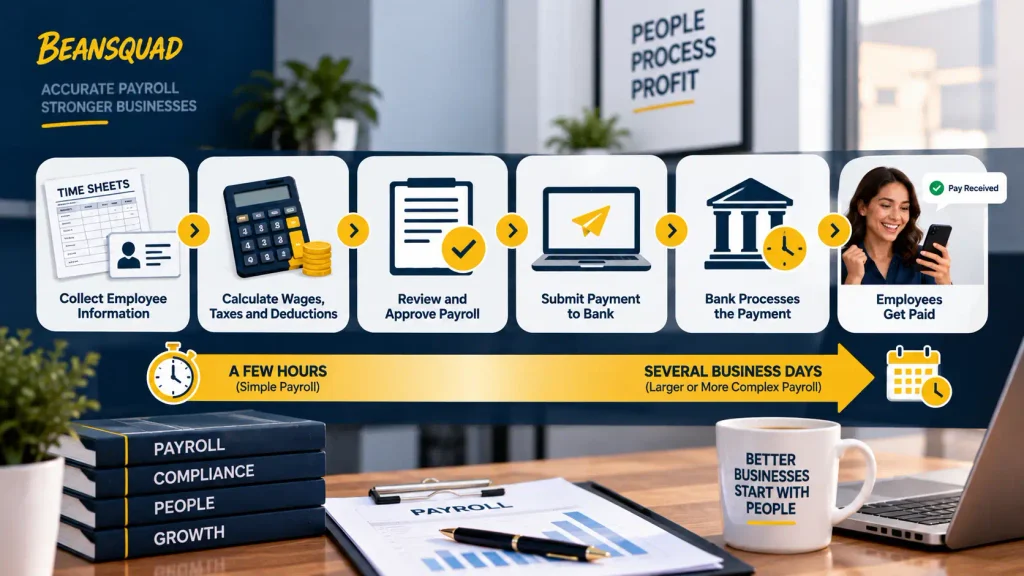
Payroll can take a few hours to several business days to process, depending on the number of employees, payroll complexity, accuracy of employee information, approval deadlines, payment method, and payroll provider. A simple payroll run with accurate records can move quickly, while larger or more complex payrolls may require more time.
Payroll processing also does not always mean employees receive their money immediately. The business must first collect and review employee information, calculate wages, taxes, and deductions, approve the payroll, and submit the payment. The payment method and bank processing schedule can then affect when employees actually receive their pay.
For businesses, the best way to avoid payroll delays is to use a consistent payroll calendar, set clear cutoff and approval deadlines, keep employee and time records accurate, and automate repetitive calculations where appropriate. Understanding the full process helps businesses plan payroll properly and avoid last-minute problems.
If payroll delays keep coming up in your business, BeanSquad’s payroll processing services can help you build a consistent, error-free payroll calendar.
What Determines How Long Payroll Takes?
There is no single processing time that applies to every business. A small company with straightforward payroll may complete its payroll run within a few hours, while a larger company with more employees, locations, pay types, or adjustments may need several business days.
The important thing is to separate payroll processing time from employee payment time. Processing involves preparing, checking, approving, and submitting payroll. Employees may receive their money later depending on the payment method and the schedule set by the payroll provider.
Typical Payroll Processing Time
For a simple payroll run, much of the work can be completed on the same day when employee information and time records are already accurate. Payroll becomes more time-consuming when staff need to correct hours, review overtime, update deductions, or resolve employee information.
Businesses should therefore plan payroll around the entire process rather than assuming the final calculation is the only step that takes time.
Payroll Processing Time vs. Employee Payment Time
A business can finish processing payroll without employees receiving their money immediately. For example, payroll may be reviewed and submitted on Monday, while the scheduled payday is Wednesday. The time between submission and payday depends on the payroll provider, payment method, and applicable processing schedule.
This distinction is important for both employers and employees because it explains why “payroll has been processed” does not always mean “the money is already in the account.”
What Factors Affect Payroll Processing Time?
Payroll processing time can vary significantly between businesses. The biggest difference usually comes from the complexity of the payroll and how well the business manages the information needed for each pay period.
Number of Employees and Payroll Complexity
A company with a small number of employees and simple pay structures may have a straightforward payroll process. Larger businesses may need to handle different pay rates, overtime, bonuses, benefits, deductions, commissions, and employee changes. Multiple locations can also create additional information that needs to be reviewed.
More employees do not automatically mean payroll will take several days. Good systems and accurate records can keep a large payroll organized.
Payroll Frequency and Schedule
The business’s pay schedule affects how often payroll needs to be prepared. Weekly payroll requires the process to happen every week. Biweekly payroll runs every two weeks, while semimonthly payroll normally follows two set pay dates each month.
The pay frequency does not automatically determine how long each payroll run takes. It mainly determines how often the business needs to complete the process and meet its deadlines.
Manual vs. Automated Processing
Manual payroll can take longer because employees may need to enter, calculate, check, and transfer information themselves. Automated payroll systems can reduce repetitive work and help connect information from timekeeping, payroll, and accounting systems. This can make the process more consistent as a business grows.
Automation still requires review. Incorrect information entered into a payroll system can produce incorrect results just as easily as a manual mistake.
Time Tracking and Data Accuracy
Accurate time records can make payroll much easier to process. When employees submit their hours correctly and managers approve them on time, payroll can move forward without unnecessary corrections. Missing hours, incorrect overtime, duplicate entries, or outdated employee information can slow down the entire process.
Payroll Cutoff and Approval Deadlines
Payroll schedules normally include cutoff dates for submitting information and approving payroll. For example, employees may need to submit hours by one date, managers may have another approval deadline, and payroll staff may have a final submission deadline with the payroll provider. When everyone follows these deadlines, the business has enough time to review payroll before payday.
Tax and Compliance Requirements
Payroll also involves taxes, deductions, and required records. Businesses need to calculate and withhold the appropriate amounts based on employee information and applicable requirements. More complex payroll situations can require additional review. Building enough time into the payroll schedule helps businesses avoid rushing these important steps.
Payment Method and Bank Processing
The way employees receive their money can affect when the funds become available. Direct deposit, paper checks, and other electronic payment methods can follow different processing schedules. Businesses should understand the deadlines provided by their payroll or payment provider and plan backward from payday.

What Happens During Payroll Processing?
Payroll processing involves several steps that turn employee work and pay information into completed payments and financial records. Each step needs to be completed correctly before payroll can be finalized.
Collect Employee and Time Information
The process begins with gathering the information needed for the current pay period. This may include regular hours, overtime, paid time off, bonuses, commissions, new hires, employee departures, and changes to deductions.
For hourly employees, time records are especially important. Missing or incorrect hours can delay the process because someone needs to verify the information before payroll can be completed.
Review and Approve Payroll Data
Once the information is collected, it needs to be reviewed. Managers may need to approve employee hours, overtime, or other adjustments. Payroll staff may also check for unusual changes, missing information, or incorrect employee details.
When records are accurate and approvals happen on time, this stage can move quickly. Problems usually arise when payroll has to go back and correct information.
Calculate Wages, Taxes, and Deductions
After the information is approved, wages and other payroll amounts are calculated. This can include regular wages, overtime, taxes, benefits, deductions, and other adjustments. The final amounts should be reviewed before payroll is submitted. For businesses with more complex payroll structures, this stage may require additional checks.
Submit Payroll for Payment
After payroll has been reviewed and approved, it is submitted through the company’s payroll provider or payment system. The submission deadline matters. Sending payroll too late can reduce the time available for the payment process and may affect when employees receive their wages.
Complete Payroll and Accounting Records
Payroll does not end when employee payments are submitted. The business also needs to maintain payroll records and complete related tax and accounting tasks. Payroll information may also need to be recorded in the company’s accounting system, including payroll expenses, employee payments, taxes, and related liabilities. For additional background on this part of the process, see Accounting for Payroll: A Comprehensive Guide for additional information on payroll accounting and related records.
How Long Does Payroll Take Based on the Pay Schedule?
Businesses can choose different payroll frequencies, and each one creates a different schedule for preparing employee payments.
| Pay Schedule | How Often Payroll Runs | Main Timing Consideration |
| Weekly | Every week | More frequent payroll deadlines |
| Biweekly | Every two weeks | Each cycle covers two weeks |
| Semimonthly | Twice each month | Uses set monthly pay dates |
| Monthly | Once each month | Fewer payroll runs each year |
Weekly Payroll
Weekly payroll means employees are paid every week. The payroll team therefore has a shorter period between payroll deadlines. This can make accurate timekeeping especially important. A late or incorrect time record may have to be corrected quickly before the next payday.
Biweekly Payroll
Biweekly payroll runs every two weeks. The business still needs to collect and review information for every pay period. The longer period between paydays does not remove the need for clear cutoff and approval deadlines.
Semimonthly Payroll
Semimonthly payroll occurs twice each month, usually on predetermined dates. This schedule requires careful planning because the number of days covered by each pay period can vary. Businesses need clear procedures for handling hours, overtime, and other pay information.
Monthly Payroll
Monthly payroll runs once each month. There are fewer payroll runs to complete, but the business still needs accurate records throughout the pay period. Missing a payroll deadline can have a larger impact because the next regular payday may be much later.

How Long Does It Take Employees to Receive Their Pay?
Processing payroll and receiving pay are two different parts of the payroll cycle. Once payroll has been submitted, the payment method and financial institutions involved can affect when employees see the money in their accounts.
Direct Deposit
Direct deposit sends employee pay electronically to a bank account. The exact timing depends on the payroll provider and financial institutions involved. Employers need to submit payroll by the required cutoff so there is enough time for the payment to reach employees.
Paper Checks
Paper checks follow a different process from electronic payments. The business may need to print and distribute the checks, so employees may receive them at a different time than employees using direct deposit.
Pay Cards and Other Electronic Payments
Some businesses use pay cards or other electronic payment methods. The timing depends on the payment provider and the employee’s account. Employers should communicate the expected payment schedule clearly so employees know when to expect their wages.
Weekends and Bank Holidays
Weekends and bank holidays can affect payment timing. This is one reason businesses should not wait until payday to begin payroll. A properly planned payroll calendar accounts for weekends, holidays, provider deadlines, and the time needed to process payments.
What Can Delay Payroll Processing?
Most payroll delays do not come from one large problem. They often start with missing information, late approvals, or small errors that were not resolved before the cutoff.
Late or Missing Time Records
If employee hours are missing, payroll cannot always be finalized accurately. The payroll team may need to contact an employee or manager, confirm the correct information, and update the records before continuing.
Incorrect Employee Information
Incorrect bank details, tax information, pay rates, or deduction information can create problems during payroll. Keeping employee records current helps reduce corrections during each payroll cycle.
Payroll Approval Delays
Payroll may be ready to process but still waiting for manager approval. Clear approval deadlines help prevent this problem. Managers should know when their review needs to be completed so payroll has enough time to meet the final submission deadline.
Overtime and Pay Adjustments
Overtime, bonuses, commissions, reimbursements, and other adjustments may require additional review. These items should be submitted before the payroll cutoff whenever possible. Waiting until the final stage can create unnecessary delays.
Tax or Compliance Problems
Payroll can take longer when employee information or tax requirements need additional review. A proper payroll review before submission can help identify issues before they affect employee payments or financial records.
Bank or Payment Issues
Payment problems can occur even after payroll has been approved. Incorrect account information, provider issues, or missed processing deadlines can affect when employees receive their money.
How Can Businesses Speed Up Payroll Processing?
A faster payroll process does not simply come from using faster software. It comes from getting accurate information into the system on time and giving each step a clear deadline.
Set a Consistent Payroll Calendar
A payroll calendar should show when employees submit information, when managers approve it, when payroll is processed, and when employees are paid. This gives everyone a clear schedule and reduces last-minute requests.
Set Clear Cutoff and Approval Deadlines
Employees and managers should know exactly when payroll information needs to be submitted. A clear cutoff gives the payroll team enough time to review records and correct problems before the final submission.
Keep Employee and Time Records Accurate
Accurate records reduce the number of corrections payroll staff need to make. Businesses should review employee information and timekeeping data regularly instead of waiting until payroll day to find errors.
Automate Repetitive Payroll Tasks
Automation can reduce repetitive calculations and data entry. It can also help connect time tracking, payroll, and accounting information. However, automation should support a good payroll process rather than replace proper review.
Review Payroll Before Submission
A final review can catch unusual wage changes, missing hours, unexpected overtime, or other differences before payroll is submitted. Finding an error before submission is much easier than correcting a payment after payday.
Build in Buffer Time
Businesses should avoid planning payroll around the last possible submission time. A small buffer gives the payroll team time to correct an error without immediately putting payday at risk.
Manual Payroll vs. Automated Payroll Processing
Manual payroll can work for a small business with straightforward employee records. As the company grows, however, manual work can create more opportunities for data entry errors and repeated calculations.
Automated systems can handle many routine calculations and reduce repetitive work. They can also make it easier to connect employee hours, payroll records, and accounting information.
The right approach depends on the business. Automation can make payroll more efficient, but accurate information and proper review remain essential.
Frequently Asked Questions
How long does payroll take to process?
Payroll can take a few hours or several business days. The timeline depends on employee count, payroll complexity, data accuracy, approval deadlines, payment methods, and the payroll provider.
How long does direct deposit payroll take?
Direct deposit timing depends on the payroll provider and financial institutions involved. Employers should submit payroll by the required cutoff to allow enough time for funds to reach employee accounts.
Does payroll process on weekends?
Weekends and bank holidays can affect payroll and payment timing. Businesses should plan payroll around their provider’s processing schedule and allow enough time for payments to reach employees.
Why is my payroll taking so long?
Payroll may take longer because of missing time records, approval delays, incorrect employee information, overtime adjustments, tax issues, or payment processing requirements.
Can payroll be processed the same day?
Some payroll providers offer same-day processing, depending on the service and payment method. Businesses should confirm the provider’s deadlines before relying on same-day payroll.
Conclusion
Payroll processing can take a few hours or several business days, but there is no single timeline that applies to every business. Employee count, payroll complexity, data accuracy, approval deadlines, payment methods, and the payroll provider can all affect how long the process takes.
The calculation of wages is only one part of payroll. Businesses also need to collect employee information, review hours and adjustments, approve payroll, submit payments, and complete related accounting and tax tasks. Employees may then need additional time to receive their money depending on the payment method and banking schedule.
Businesses can reduce delays by keeping records accurate, setting clear cutoff dates, approving payroll on time, using reliable payroll systems, and allowing enough time for payment processing. A consistent payroll process makes it easier to meet payday deadlines while keeping financial records organized.
Need Help Managing Payroll and Bookkeeping?
Payroll affects more than employee payments. It also connects with bookkeeping, tax records, cash flow, and financial reporting. BeanSquad in Westport, CT helps businesses keep these financial processes organized and easier to manage.
If payroll is becoming harder to handle as your business grows, professional bookkeeping support can help you maintain accurate records and a more consistent payroll process.