
A virtual bookkeeper manages your business’s financial records remotely using accounting software and online communication. They record transactions, reconcile bank and credit card accounts, and prepare financial reports. Some also handle invoices, bills, or payroll, while tax preparation and other services depend on the agreement.
“Virtual” describes how the service is delivered. A real person or team reviews your records, asks questions, and helps resolve errors. At BeanSquad, we work with franchise owners whose bookkeeping may involve multiple locations, sales systems, and reporting requirements.
You can work with a freelancer, a bookkeeping firm, or a remote employee. A virtual professional can also be a full-charge bookkeeper, taking responsibility for the complete bookkeeping process. Before hiring, check their experience, included services, reporting deadlines, and security practices. The right arrangement should fit your workload while keeping you informed and in control of payment approvals.
A virtual bookkeeper manages your business’s financial records remotely using accounting software and online communication. They record transactions, reconcile accounts, and prepare financial reports without working at your office. Their exact responsibilities depend on the services you agree to hire them for.
For business owners, this means getting bookkeeping support without needing someone on-site. At BeanSquad, we work with franchise owners whose records may involve several locations, sales systems, and reporting requirements.
This guide explains what a virtual bookkeeper does, how the working relationship functions, and what to check before choosing a provider.
What Does a Virtual Bookkeeper Do?
A virtual bookkeeper maintains your financial records by recording activity, checking account balances, and preparing agreed reports. Billing, payment processing, and other services may be included, but you should confirm them in the service agreement.
Record and Categorize Income and Expenses
The bookkeeper records business transactions and assigns them to the correct accounts, such as sales, rent, supplies, and bank fees. They also distinguish ordinary income and expenses from items such as loans and transfers between your own accounts.
For example, moving money from business checking to business savings should not create another sale or expense. A bookkeeper checks the purpose of the transfer and records it accordingly. When a transaction is unclear, they need supporting details rather than a guess based on the vendor’s name.
Reconcile Bank and Credit Card Accounts
Reconciliation means comparing your accounting records with bank and credit card statements and explaining differences. The bookkeeper looks for missing charges, duplicate entries, and timing differences, such as a recorded check that has not been cleared.
This review is separate from downloading transactions. If a bank charge appears twice in the books, importing more data will not resolve it. The bookkeeper must identify the duplicate and correct the records while preserving an explanation of the change.
Track Customer Invoices and Supplier Bills
A bookkeeper may track money customers owe you and bills your business needs to pay. These are called accounts receivable and accounts payable. Depending on the agreement, they may also send invoices, follow up on overdue balances, and prepare supplier payments.
For example, an unpaid invoice might remain open because a customer’s payment was recorded without being matched to it. Checking the records before sending a reminder helps avoid asking the customer to pay twice. Payment preparation and final approval should remain clearly assigned responsibilities.
Prepare Financial Reports
The bookkeeper prepares reports from the reviewed records so you can see the business’s financial position. Common reports include a profit and loss statement, which shows revenue and expenses over a period, and a balance sheet, which shows assets, liabilities, and equity at a particular date.
A cash flow statement or location-level reports may also be included. Ask what each report contains and whether explanations accompany it. Receiving a spreadsheet is less useful if you cannot tell which period it covers or whether unresolved items could change the figures.
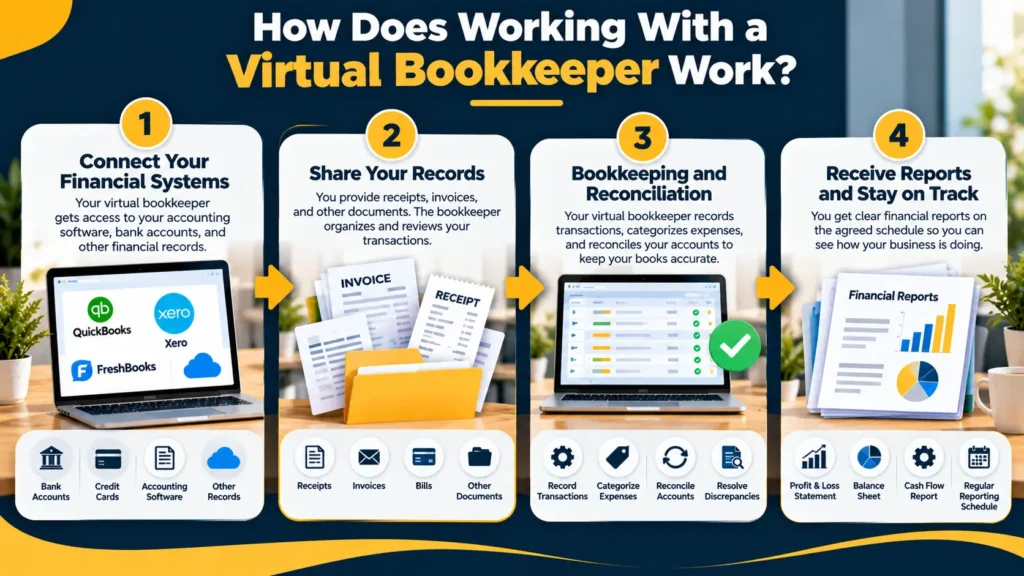
How Does Working With a Virtual Bookkeeper Work?
The relationship usually starts with a review of your existing books, followed by a shared process for supplying records, resolving questions, and receiving reports. Both sides need clear responsibilities because the bookkeeper cannot observe your daily operations in person.
Onboarding and Connecting Your Financial Systems
During onboarding, the provider reviews your accounting setup, financial accounts, and current records. They identify the starting point for ongoing work and whether earlier months need cleanup first.
You may need to provide bank statements, prior reports, loan details, payroll summaries, and access to your accounting software. If you operate a franchise, include any required account categories or reporting formats. Agree on which systems will connect and who will manage those connections before work begins.
Sharing Records, Answering Questions, and Approving Payments
You supply documents and business context while the bookkeeper processes the records and flags questions. A shared portal or document folder can keep receipts and invoices organized instead of scattered across messages.
Supporting documents still matter when transactions arrive automatically. The IRS explains that purchases, sales, and payroll generate records needed to support bookkeeping entries. A bank description alone may not explain what you bought or why the business paid for it. Agree on a regular time to answer questions. If payment support is included, also decide who approves payments and how urgent requests reach the right person.
Agreeing on Reporting Deadlines and Reviewing Results
Set dates for submitting documents, resolving questions, and receiving completed reports. The provider should explain how missing information affects those dates and how you will know when a month is complete.
A live dashboard is not necessarily a finished set of books. Transactions may still need review, and some expenses may not yet be recorded. Ask which figures are provisional before using them to make decisions. For a detailed breakdown of the underlying tasks, see our monthly bookkeeping checklist.
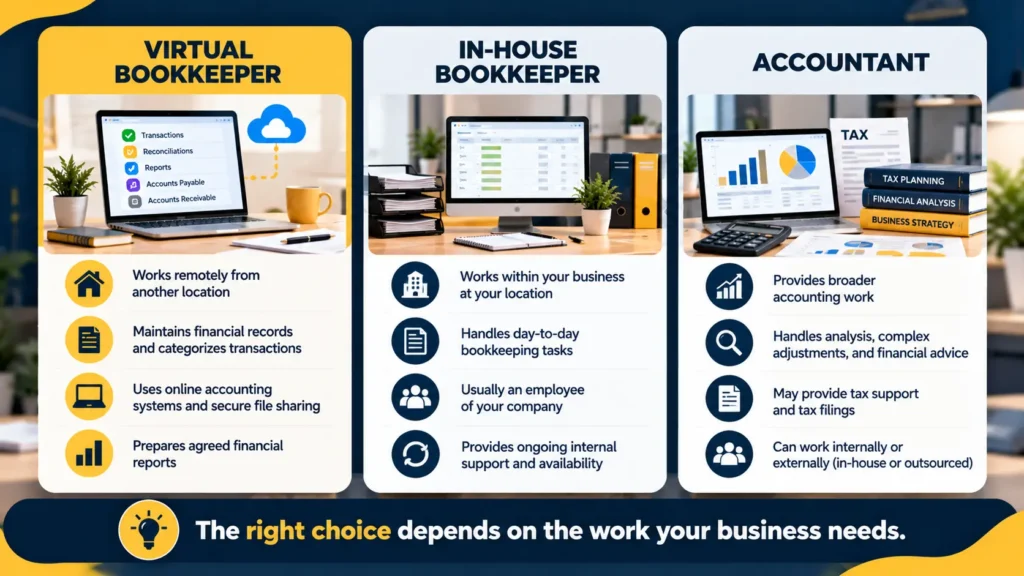
Virtual Bookkeeper vs. In-House Bookkeeper vs. Accountant
A virtual bookkeeper and an on-site bookkeeper can perform the same bookkeeping tasks. An accountant may provide broader accounting analysis, complex reporting, or tax services, depending on their expertise and engagement. Location and professional responsibilities are separate questions.
| Option | Main Role | Working Arrangement | What to Clarify |
| Virtual bookkeeper | Maintains financial records and prepares agreed reports | Works remotely as an employee, freelancer, or firm | Availability, access, included tasks, and reporting dates |
| In-house bookkeeper | Handles bookkeeping within your business | Usually an employee; may work on-site or remotely | Daily responsibilities, workload, and backup coverage |
| Accountant | Handles agreed accounting work, which may include analysis, complex adjustments, or tax support | Can work in-house, externally, on-site, or remotely | Relevant expertise and the exact services included |
These options can work together. A business might use a remote bookkeeper throughout the year and an outside accountant for tax preparation and more complex questions. Hiring a virtual bookkeeper does not automatically replace that accountant.
What Software and Tools Do Virtual Bookkeepers Use?
Virtual bookkeepers use an accounting platform alongside tools for exchanging documents, managing work, and communicating with clients. The right setup depends on your existing systems and the services required.
The accounting platform holds the books. Bank connections import transaction data, document tools collect receipts, and payment systems may support invoices or bill approvals. For a retail or franchise business, the setup may also need to exchange information with a point-of-sale system, which records customer sales.
Automation helps with repeated tasks, but its output still needs review. For example, Intuit’s guidance on categorizing downloaded transactions tells users to review suggested categories and change them when needed. Software suggestions are a starting point, not proof that an entry reflects the business transaction correctly.
Before adding tools, ask what problem each one solves. Too many disconnected apps can create duplicate records and extra checking. A useful system makes it clear where documents belong, which records are authoritative, and who handles connection errors.
What Are the Benefits of Hiring a Virtual Bookkeeper?
The main benefits are less routine bookkeeping work for the owner, access to professionals beyond the local area, and support that can fit the business’s workload. Those benefits depend on the provider’s capability and the arrangement you choose.
Outsourcing may suit a business that needs regular help but does not have enough work for a full-time employee. It can avoid some costs associated with a dedicated position, although software, cleanup, and additional services can affect the total. Compare equivalent scopes rather than assuming remote support is always cheaper.
Location flexibility can also help you find someone familiar with your business model. For a franchise owner, that might mean experience with royalty records or location-level reporting.
What Are the Limitations of Virtual Bookkeeping?
Virtual bookkeeping depends on timely digital records, reliable system access, and clear communication. It may be less suitable when essential work requires someone physically present or when the business cannot supply complete information remotely.
For example, someone on-site still needs to count cash or check physical inventory where those tasks apply. A remote bookkeeper can record and review the results, but cannot confirm a physical count through a bank feed.
Availability also matters. A provider serving several clients may respond within agreed hours rather than immediately whenever a question arises. Time-zone differences can make an unclear communication process harder to manage.
The role has professional limits too. Routine bookkeeping does not automatically include tax advice, an audit, financial forecasting, or complex accounting decisions. Identify where additional expertise is needed so that tasks do not fall between the bookkeeper, accountant, and owner.
When Should a Business Consider a Virtual Bookkeeper?
Consider remote support when recurring bookkeeping work is taking time from running the business and your records can be shared digitally. The need is often clearer from unfinished tasks than from a specific revenue level.
Useful signs include reconciliations falling behind, uncertainty about customer balances, and reports arriving too late to help with decisions. First identify the cause. Missing receipts may require a better document process; more complicated transactions may require a more experienced provider.
Remote support can fit service businesses, online sellers, and businesses with several locations, provided the provider understands their systems. A franchise owner should also check whether the service can meet the brand’s reporting requirements. Those wider responsibilities are covered in our franchise bookkeeping guide. If your current process is accurate, timely, and manageable, changing providers or hiring additional help may not be necessary. Start with the problem you need solved.
How Do You Choose the Right Virtual Bookkeeper?
Choose a provider who understands your records, can explain their working process, and puts responsibilities in writing. Evaluate practical ability and service fit rather than relying on a job title or a low advertised fee.
Check Relevant Experience and Software Skills
Look for experience with businesses that have similar transactions, systems, and reporting needs. A provider familiar with simple service invoices may need different experience to manage multiple retail locations or several payment processors.
Ask how they would investigate a payment that does not match an invoice or a disconnected bank feed. Their answer should describe a clear checking process. Certifications and training can support your assessment, but ask for practical examples as well.
Confirm Included Services and Communication Expectations
Get a written description of the accounts covered, work performed, reports delivered, and communication schedule. Confirm whether cleanup, payroll, payment processing, and tax support are separate services.
Name your main contact and ask who provides coverage during absences. Agree on response expectations and how unresolved questions are escalated. When comparing proposals, check that they cover the same workload and explain how additional accounts or locations would affect the agreement.
Check References, Review Processes, and Record Ownership
Ask for relevant references and an explanation of how completed work is checked. A sample report with confidential details removed can show whether the provider presents information clearly.
Confirm your access to accounting files and supporting documents throughout the engagement. Ask how exports, subscriptions, and handover work if you leave. You should understand what you will receive and who controls administrative access before you depend on the provider’s system.
Conclusion
A virtual bookkeeper can manage your records remotely, but the usefulness of the service depends on its scope, communication, and review process. Start by listing the tasks that are unfinished or consuming too much of your time.
Use that list to compare providers and agree on responsibilities, reporting dates, and access controls. A clear working arrangement gives you a practical way to judge whether the service meets your needs after it begins.
Discuss Your Franchise Bookkeeping Needs With BeanSquad
If you own a franchise, BeanSquad can help you assess the bookkeeping support your business needs. Our franchise bookkeeping services cover recurring transaction recording, account reconciliation, and monthly reporting, with support shaped around your operations.
Bring your questions about existing software, overdue records, or additional locations to the conversation. We can discuss your current process and explain the services relevant to your business. Book a consultation with BeanSquad to review your bookkeeping needs and the next steps.
Frequently Asked Questions
Can a Virtual Bookkeeper Handle Payroll?
Yes, if payroll is included in their services. Confirm whether they process payroll, handle filings, or only record payroll reports from another provider. Assign approval and filing responsibilities clearly.
Can a Virtual Bookkeeper Catch Up on Overdue Books?
Yes, many providers offer catch-up or cleanup work. They need access to historical statements and supporting documents. The time and fee depend on how much work is missing and whether existing entries need correction.
Do You Need to Change Your Accounting Software?
Not necessarily. A provider may be able to work with your existing platform. If they recommend switching, ask why, what will transfer, and how historical records will remain accessible.
Can You Keep Your Existing Accountant?
Yes. Your virtual bookkeeper can maintain the records while your accountant handles separately agreed work. Establish how they will share information and resolve questions so important tasks are neither duplicated nor overlooked.